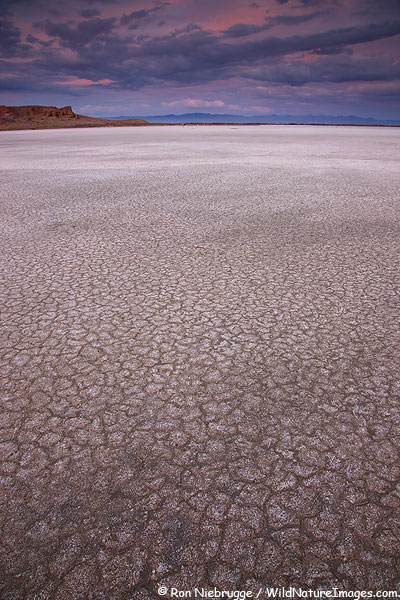
A sunset at the Salton Sea California from this past winter.
I have received numerous emails and comments over the past year asking me to post bigger photos. Really, I haven’t been ignoring those requests, it just wasn’t possible because my old theme was so narrow. It was probably fine in the days of 800 x 600 monitor resolutions, but today, I just ended up with a narrow blog and a bunch of gray space on either side!
So I had enough of my old theme, and there was no way I was going to try to modify it – heck, just adding the photo to the banner took me a day! So this past weekend I went on a search for a new theme. I won’t bore you with the details, but there are thousands and thousands of themes out there – and of course none of them are just right. That is when I found Thesis; About Thesis — Find out more about Thesis and the DIYthemes philosophy
With Thesis, I had total control. To change to three columns instead of my previous two – I just selected the 3 column option in the drop down menu. I wanted an extra wide column for my large photos – all I did was type in the desired width in a little box and bingo, it changes! Not only does it change, but everything lines up perfectly – something that was a constant battle before. Would I prefer the side bars on each side, with the content down the middle? You guessed it, just another click. Rotating photos at the top of the sidebar – painless! Supposedly they have great support, fortunately I didn’t need it, but I did drop by the online forum which has almost six thousand users.
Had this theme been around when I originally set up my blog with my limited knowledge, I could have freed up days of work that I will never get back.
Now here is the drawback, and one that took me a few hours to get past; it isn’t free. The theme only costs $87, which is more then fair, but with so many free alternatives, I had to exhaust my search for the perfect free theme first.
So now, I can post much bigger photos!


Comments 22
Nice and big. I like it!
Author
Thanks John!
Hey Ron,
Finally .. a wider blog — and you post a vertical image. 🙂
I miss the banner at the top.
I know what ya mean about all those hours trying to figure out how to tweak a theme though .. man, if only . do you have ANY idea how good I might be able to ski had I not had to do all that work?
Cheers
Carl
Author
Hey thanks Carl,
Funny, I did go with a vertical – O well.
You seem to be pretty good a making time for skiing. 🙂
Ron
Wow. Initially i thought that photo was of the Death Valley. I have never seen the Salton Sea like that before.
Great choice in WP theme too.
Very nice! Really suits your photos nicely!
I’ll take you one step further though, you should check out a site called PhotoShelter if you haven’t already. Does some amazing things for a photographer’s website.
As always though, great image!
Ron this is a pretty picture of the Salton Sea. The big pictures are nice, but it took me a minute or two the figure out how to get to the current posts. Have a great day.
Wow, really nice! I like the fact that the photo changes at the top right every time you click on “home”. After reading this I have a greater appreciation and understanding of all the work you and Janine did for me to set up my blog.
Love, Mom
Author
Hi Richard,
Does have a DV look. Here I had my back to the lake – I’m assuming the water level was down somewhat.
Thanks for the suggestion Mike. I was with Digital Railroad, and have considered PS – maybe in the future.
Thanks Dennis – I may have some fine tuning to do!
Ron
Author
Hey Mom – Thanks! I really like the rotating photo feature as well.
Ron
The redecorating looks good Ron!
Author
Thanks Mark!
Wow – Nice new clean look! Good choice!
Author
Thanks Rick!
Wow, Ron. Just catching up on my web reading this afternoon after a a few days in Tahoe, sans computer, and WOW – look what I get. Great job, every bit of it, well, ‘cept maybe for the ads, but $$$ count I suppose. 🙂
Cheers & congrats on the new look.
Author
Hey thanks a lot Gary!
The ads are a tough one – tried a week with Google ads, but didn’t like how they looked, or who was being advertised. Now trying this – if they don’t do great, they will be gone too!
Ron
Now this is really cool Ron!
I just ran across your post over at Naturescapes and had to check this new theme out.
I too wish that I had something like this 4-5 years ago when I started my first blog, and it certainly is something that I will take a good look at for my current blog, and a new type of blog that I am working on.
Not having much of a chance yet to dig really deep into what they offer or exactly what can be done with the new Thesis theme, … have you noticed if one can change the background colors within the theme, say maybe to a light gray if one chooses to do so?
And, … is there any system requirements needed to use this theme?
Have you heard if things could be easily transferable from a old WordPress.com blog to the new theme, without loss of existing comments?
I’m certainly glad I ran across this, and has me a bit excited after seeing what you have accomplished.
Again Ron, ….. cool stuff for a guy who produces excellent imagery!
Michael
Author
Hi Michael,
Great to hear from you, and thanks for the kind words – means a lot coming from you!
Yeah, changing themes was painless, didn’t lose any comments or posts. In fact, you can easily hop back and forth between the new theme and your old one as you fine tune the look.
You can change the colors as well – it isn’t as easy as changing fonts, columns etc., I believe you do it through a Cascade Style Sheet. I went with the default colors, but from a glance at their forums, it sounded fairly easy. If you go to their site, you can see a lot of sample sites by users of Thesis, they all look very different.
There aren’t any systems requirements that I’m aware of – I have mine on a bare bones hosting package right now.
Hope that helps – let me know if you have any other questions.
Good luck,
Ron
Thanks again Ron,
Just did a bit of searching around, and found out that it would need to be hosted on one’s own server. I have of course the free WP site.
When I decide on how I want to integrate my site with Photoshelter, (http://pa.photoshelter.com/c/macroartinnature), and host it all myself, I will certainly give this new theme a try.
Thanks again Ron for letting us know about this new theme.
It has my brain churning now! : )
Michael
Author
OK, I was already hosting mine, so that made the transition easier.
By the way, I spent some time on your new website last week – it rocks! You have done a wonderful job, and the photos are outstanding!
Ron
Thanks Ron,
I would like to add, that if it was the Smugmug site you were looking, I will be letting that go and moving back to Photoshelter. I will have a front page similar to what you see at SM, … but the galleries going through PS.
The clients like PS much much better it seems.
Michael
I leave on a trip and come back and everyone seems to have upgraded their blog with a new theme. Great looking theme. It’s quite sharp looking. I like it quite a bit. Bigger photos are always nice.